


According to LinkedIn, I’m not working as a human resources professional. And I can’t decide if I should be offended or just amused.
For years, I’ve said I work in recruitment, only to be told, “Oh, so you’re HR.” Now LinkedIn has informed me that I’m not part of the HR club at all, even though recruitment has been part of HR since forever.
A file in my LinkedIn data export has a line that reads "Human resources professional: No.
That file is called Inferences_about_you.csv, and mine has two lines.
The LinkedIn data export around it is much bigger. My download came back as 48 CSV files with names like Votes.csv and Security_Challenges.csv, and not one word explaining what any of them contain. Most people who request it open Connections.csv, scroll for a minute, and close the folder.
I did exactly that the first time. The second time I opened every file. The big ones are logs of things you already know you did. The small ones are where LinkedIn writes down its conclusions about you.
You can get yours under Settings, then Data privacy, then Get a copy of your data. Choose the larger archive. LinkedIn’s help page says the email with the link arrives within 24 hours, and the link works for 72 hours after that, so don’t request it on a Friday before a week offline. You might receive two emails: the first contains a smaller file, and the second contains a larger one.
Keep in mind that not all files in your folder will match mine. The file count depends on what you’ve done on the platform, so some people get fewer than 40 and heavy users get more. The six biggest will almost certainly be Comments, Connections, Invitations, Messages, Reactions and Shares. I’m going to skip all six. They’re long and they tell you nothing you couldn’t guess.
LinkedIn decided my gender and my job
One line from my Inferences_about_you.csv file says “Inferred gender: male.” It’s correct. It’s also a guess based on my first name. LinkedIn never asked me about it; it just guesses.
Guessing gender from a name sounds trivial until you look at how often it fails. In 2018, Lucía Santamaría and Helena Mihaljević tested five name-to-gender services on 7,076 names that people had labeled by hand. On European names, the services gave the wrong gender for between 1.36% and 2.18% of the names they classified. On Asian names, the error rate was between 6.41% and 12.06%, depending on the service.
I haven’t seen LinkedIn publish which method it uses. But if your name is common in two languages, or it’s rare in whatever data the model learned from, the guess about you is shakier than the one about me.
The second line bothers me more. The file says the HR label comes from your industry and your headline. My headline is about recruiting and talent acquisition, and that apparently doesn’t count. My guess is that the model wants the literal letters “HR” somewhere, or an industry field that looks like HR. That’s a guess, and I could be wrong about how it works.
There’s something odd about a company built on professional identity getting my profession wrong while getting my gender right from a first name, when I would have simply told them my gender if anyone had put a field on the profile page asking for it.
Why it matters: these labels can decide which audiences you’re grouped into, which ads you see, and which group you’re compared against. If the label is wrong, everything built on top of it starts from the wrong place.
If you’re in the EU, you have options. Article 16 of the GDPR gives you the right to get inaccurate personal data corrected “without undue delay,” and you can object to LinkedIn using inferred data. The faster fix would be adding “HR” to my headline. I haven’t done that, because I don’t want to write my headline for a classifier, and I’m aware that’s a choice with a cost.
LinkedIn scores my credibility on 117 topics
Inferred_Credibility_Scores.csv is the file I’ve spent the most time in, and it’s the one I’d tell you to open first.
Each row is a score. The columns are ScoreType, Topic, Category and Range, then one column per date, newest first. Many cells are empty because not every score gets updated on every date. There are three families of scores in it:
Knowledge topics. Use the “Topic normalized score” rows, on a scale of 1 to 4, and ignore the raw “Topic score” rows.
Expertise, scored per skill across five dimensions: Role and scope, Tenure and experience, Content and output, Education and credentials, and Validation and influence. Each runs 1 to 4.
Notability, with sub-scores from 0 to 5, an aggregate score and a tier.
Higher means LinkedIn sees more credibility. 1.00 is the floor and means it found no expertise at all.
Reading this by hand is miserable. I gave the file to an AI model with this prompt:
Attached is my “Inferred_Credibility_Scores.csv” file from my LinkedIn data export. Read the entire file before answering.
How the file works:
- Each row is a score. Columns are ScoreType, Topic, Category, Range, followed by one column per date (newest first). Many cells are empty because not every score is updated on every date.
- Use the “Topic normalized score” rows (scale 1 to 4) for knowledge topics. Ignore the raw “Topic score” rows.
- Notability sub-scores run 0 to 5, expertise dimensions run 1 to 4. Higher means LinkedIn sees more credibility. 1.00 is the floor and means no expertise detected.
Give me:
1. My top 10 and bottom 5 knowledge topics, using the most recent value for each.
2. My notability scores and tier, and how the aggregate notability score changed over time.
3. Every expertise skill listed, with its five dimension scores.
4. The 5 biggest increases and 5 biggest decreases between the oldest and newest value.
Show the numbers in simple tables and finish with a 3-sentence plain-language summary of how LinkedIn sees me.
As always, you can customize and edit the prompt to fit your goals. But upload only this one file with this prompt!
This is the summary I received:
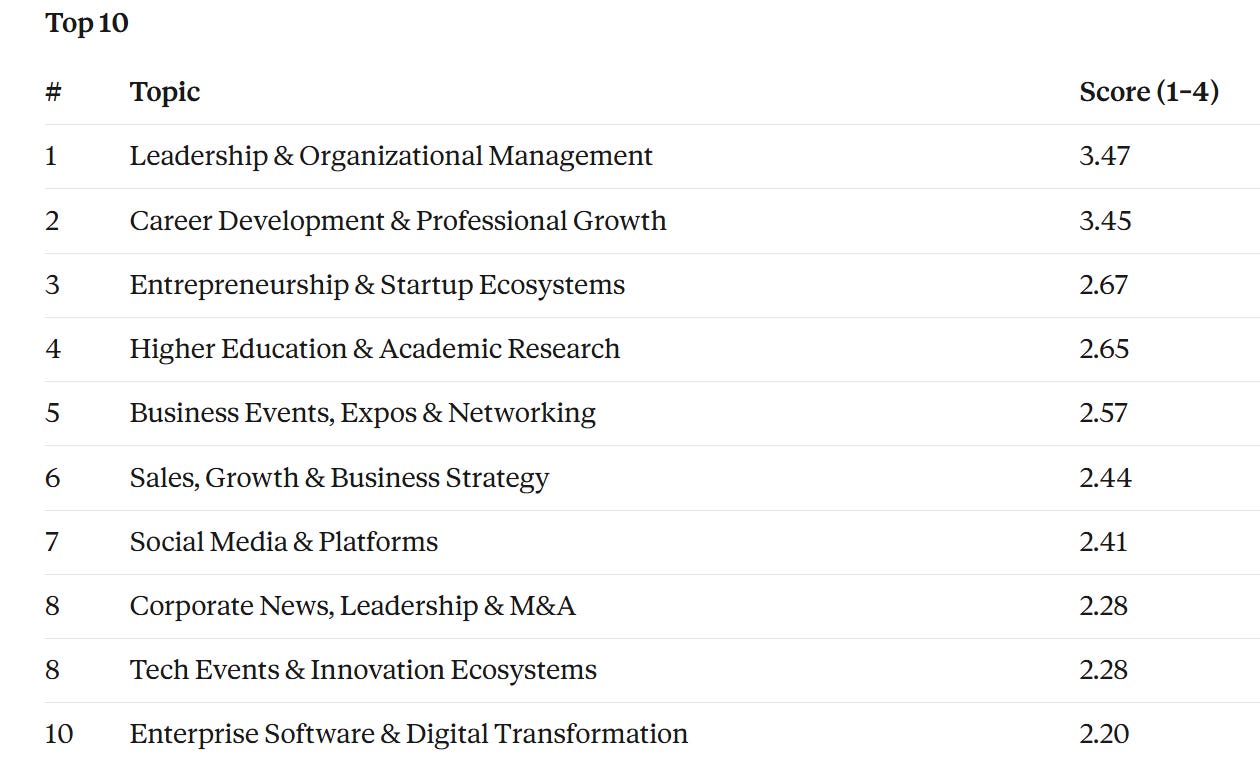
From AI: LinkedIn sees you as a senior recruiting and talent acquisition leader, with near-top scores (4 of 4) for role, tenure and content output on every recruiting skill it tracks. Outside recruiting, your clearest areas are leadership and career development.
Outside recruiting, my clearest areas were leadership and career development. It was flattering, and I learned almost nothing from it.
I wrote a longer prompt (it’s at the end of this article). Before it touches the data, it asks about your role, what you post about most, the topics you want to be known for and your goal on LinkedIn. It computes everything with code instead of eyeballing, and it compares what you want against what LinkedIn actually scores.
That version changed my mind about one thing. On the first pass I thought my scores were falling. Almost every topic was lower in the newest column than in the oldest.
The longer analysis found that most of the drop happened on one date, around September 7, across topics that had nothing to do with each other. When dozens of unrelated scores move on the same day, the likely explanation is that LinkedIn changed its model that day. Measured by rank against my other topics, my core topics actually got stronger.
The gaps it found were more useful than the praise. Education and credentials never reach 4 on any skill. Event speaker and Honors both sit at 2. AI in recruiting is strong as an Expertise skill but only mid-pack as a Knowledge topic.
Hiring lost its Employer Branding signal after July, and I don’t know why. Building AI products, which I do a lot, has no Expertise signal at all. My two leading Knowledge topics sit far above the other 115.
Most of those gaps point to profile sections I’ve ignored, like speaking, honors, publications, and certifications. Some point to how I frame posts. If I write about an AI tool I built but describe it as a recruiting story, LinkedIn may file it under recruiting, where it already trusts me, and the AI products score stays empty.
Why am I still in “Jobs in Poland”?
Ad_Targeting.csv shows how advertisers can target you: the companies you follow, the groups you’re in, your location and your language. Some columns may be blank depending on your ad settings.
My groups list still includes “Jobs in Poland,” “Account Executive Jobs” and “FoodTech & AgTech Jobs.” I joined most of those years ago for sourcing and forgot about them. LinkedIn didn’t forget. It still uses them to describe me, so somewhere an advertiser can treat me as a person looking for account executive jobs in Poland.
Leave the groups that no longer fit; I did that! Most people don’t know that group membership feeds into how LinkedIn describes them. There’s a small cost, though. If you’re job hunting in a narrow field, one of those dusty groups might be the only place a certain recruiter still posts roles, and once you leave, those posts are gone from your view.
Other Files and More Advanced Prompts
The other files are pretty interesting too. They can help you tailor your profile, tidy things up, and nudge LinkedIn’s AI to show you in the right categories and groups. They can even reveal whether someone else has accessed your account.